ReID Appearance
BoT-SORT can fuse appearance embeddings with IoU during association. Embeddings come from a model in the standalone reid package. See the ReID API for the association helpers.
What you'll learn:
- How to enable appearance association on BoT-SORT
- Which parameters control the appearance gate
- How to pick
reid_config.appearance_thresholdfor your encoder and domain - What ReID changes on MOT17, SportsMOT, DanceTrack and SoccerNet, with a generic and a fine-tuned encoder
- What ReID costs in frames per second
Install
For extra contents and other options, see the install guide.
Quickstart
from trackers import BoTSORTTracker, ReIDConfig

tracker = BoTSORTTracker(reid_model="fastreid_mot17_sbs50", reid_config=ReIDConfig(appearance_threshold=0.2))
reid_model takes a curated alias, an hf:// URL, or a local path, and loads it with the reid package's defaults. To choose the device or load bare weights, load the encoder yourself and pass it instead:
--reid.model takes a curated alias, an hf:// URL, or a local path, and enables appearance association on its own. Tracker parameters keep their Python names, so the appearance gate is --tracker.reid_config.appearance_threshold. See the CLI reference for every argument.
A frame is required when ReID is enabled
Pass the current video frame as tracker.update(detections, frame=frame_bgr). When reid_model is set, update() raises if frame is omitted.
Fine-tuning an encoder on your own data is coming to the reid package.
Key Parameters
| Parameter | Purpose | Tuning guidance |
|---|---|---|
reid_model |
Appearance encoder queried during association. | Leave unset for IoU and CMC only. Pick a checkpoint trained on your object domain where possible. |
reid_config.ema_alpha |
EMA momentum for a track's appearance feature. | Default 0.9. Higher keeps a stable long-term identity; lower adapts faster to appearance change but drifts more. |
reid_config.appearance_threshold |
Maximum appearance distance for appearance to count, with either fusion method. | Default 0.25. Calibrate per encoder and domain, see below. |
reid_config.proximity_threshold |
IoU gate applied before appearance (IoU ≥ 1 - reid_config.proximity_threshold), from true IoU even with GIoU/DIoU/CIoU. |
Default 0.5. Raise to 1.0 where targets leave the frame and return, see below. |
reid_config.fusion |
How appearance combines with geometry: "botsort" takes the minimum of the two costs, "adaptive" adds a weighted appearance term. |
Default "botsort". See choosing a fusion method before switching. |
reid_config.appearance_weight |
Base appearance weight when reid_config.fusion="adaptive". Ignored otherwise. |
Default 0.75. Raise where geometry is unreliable, see below. |
reid_config.adaptive_weight_cap |
Ceiling on the adaptive bonus when reid_config.fusion="adaptive". Ignored otherwise. |
Default 0.5. Raise together with reid_config.appearance_weight. |
Choosing an encoder
The encoder decides how much appearance can help, and every threshold below depends on it. There are two kinds:
- A generic encoder, used as published. The one used here is
"fastreid_mot17_sbs50", a FastReID SBS model with a ResNeSt-50 backbone and 25.4M parameters, trained on MOT17 pedestrian crops and released with BoT-SORT.trackers trackandtrackers tuneload it when ReID is enabled without naming a model; in Python, passreid_model="fastreid_mot17_sbs50", as in the quickstart. It works out of the box, and how much it helps depends on the dataset, see results. - An encoder fine-tuned on your footage, where the largest gains in the results come from. The results use an OSNet x1.0, a much smaller network with 2.2M parameters, fine-tuned on each dataset's train split. All four are available by name:
osnet_x1_0_mot17,osnet_x1_0_sportsmot,osnet_x1_0_dancetrackandosnet_x1_0_soccernet. Pass the name asreid_model="osnet_x1_0_sportsmot", or to--reid.modelon the command line. Training your own is coming to thereidpackage.
Each encoder has its own distance scale, so choose the thresholds for the encoder you will track with.
Choosing a fusion method
On every frame, BoT-SORT gives each track and detection pair a score and then picks the best matching. With ReID enabled, that score combines two signals: how much the boxes overlap, and how alike the two crops look. reid_config.fusion sets how they are combined:
tracker = BoTSORTTracker(
    reid_model=reid_model,
    reid_config=ReIDConfig(fusion="adaptive"),  # default: "botsort"
)
"botsort": a pair scores as well as the stronger of the two,score = 1 - min(box distance, appearance distance)."adaptive": the two add up,score = box overlap + weight * appearance similarity.
In more detail:
"botsort". Appearance is only used for a pair when its distance is below reid_config.appearance_threshold and the boxes pass the reid_config.proximity_threshold check. Otherwise the pair is scored on box overlap alone.
"adaptive". This is the appearance fusion from Deep OC-SORT. Each pair starts from its box overlap, and appearance is added on top: score = box overlap + (reid_config.appearance_weight + bonus) * appearance similarity. The bonus rewards a clear winner. For a track, it is how much more its most similar detection looks like it than the second most similar one; for a detection, the same against its two most similar tracks. Each margin is capped at reid_config.adaptive_weight_cap, and the pair's bonus is their average. So appearance counts more when one candidate clearly stands out, and less when several look alike. Negative similarities count as zero, so appearance can only raise a score. reid_config.appearance_threshold applies here too: a pair whose appearance distance is above it is scored on box overlap alone. With the proximity gate open, it stops a lost track from taking an unrelated detection that only looks vaguely similar.
What adaptive includes
Only the appearance fusion is taken from Deep OC-SORT; the rest of that tracker is not added to BoT-SORT.
Two consequences are worth knowing before switching:
- The similarity range changes.
"botsort"returns values in[0, 1];"adaptive"returns[0, 1 + reid_config.appearance_weight + reid_config.adaptive_weight_cap], which is[0, 2.25]at the defaults. Two thresholds are applied to that fused value:minimum_iou_threshold_first_assoc, which matches detections to confirmed and lost tracks, andminimum_iou_threshold_unconfirmed_assoc, which matches what is left to tracks that are not confirmed yet. Both are a different gate under the other method, so retune them when you switch, or the comparison measures the gate rather than the fusion.minimum_iou_threshold_second_associs unaffected, because that step matches on IoU alone. - The weights are domain-dependent. The Deep OC-SORT paper uses
reid_config.appearance_weight=0.75withreid_config.adaptive_weight_cap=0.5for MOT17, and1.25with1.0for DanceTrack, where dancers occlude constantly and geometry carries less. The defaults here follow the MOT17 pair.
Which to use. "botsort" keeps only the better of the two scores once a pair's appearance distance is below the threshold, so a wrong match that looks close can override the boxes. "adaptive" always combines appearance and box overlap in the same score, so appearance moves every score but never replaces box overlap. In our results with the generic encoder, "adaptive" did better where the encoder told people apart well (ROC AUC 0.96 on MOT17, 0.91 on SoccerNet), and "botsort" where it did less well (0.86 on SportsMOT, 0.72 on DanceTrack). Measure your encoder's ROC AUC as in How far the threshold carries, and try both.
Choosing an appearance threshold
This threshold applies to both fusion methods and defaults to 0.25.
reid_config.appearance_threshold is how different two crops may look and still count as the same target. Appearance is compared as a distance, 0.5 * (1 - cosine similarity), running from 0 for identical crops to 1 for opposite ones; the BoT-SORT paper uses 0.25. Below the threshold, looking alike makes the tracker more willing to pair the two; above it, the pair stands on box overlap alone. Appearance only ever lowers a pair's cost, never raises it, but the assignment weighs every pair at once, so a look-alike pair can still take a detection away from a track that merely overlapped it.
The right value depends on the encoder and the footage, so measure it on labeled data:
- Embed the ground-truth crops with the encoder you will track with.
- Compare pairs of crops that could meet during tracking: same video, at most the lost-track buffer apart (30 frames by default). Take the same number of pairs from each sequence, so one crowded video does not decide the result.
- Pick the value that keeps most same-person pairs below it and lets few different-person pairs through.
Trackers has a helper for each step. extract_ground_truth_embeddings reads any dataset in MOT format:
from trackers.reid import (
    extract_ground_truth_embeddings,
    plot_appearance_distances,
    sample_appearance_distances,
)

embeddings, ids, frame_ids, sequence_ids = extract_ground_truth_embeddings(
    "fastreid_mot17_sbs50", "mot17/val", keep_classes=(1,)
)
distances = sample_appearance_distances(embeddings, ids, frame_ids, sequence_ids, different_id_pairs=10000)
for threshold in (0.10, 0.20, 0.25):
    same_id_rate, different_id_rate = distances.rates_at(threshold)
    print(f"θ={threshold:.2f}: same-ID {same_id_rate:.1%}, different-ID {different_id_rate:.1%}")

plot_appearance_distances(distances, thresholds={0.20: "selected", 0.25: "default"})
The ReID API reference lists the full signatures, and the ReID cookbook runs the whole flow in Colab. The example below uses 5000 same-person and 10000 different-person pairs, 1 to 30 frames apart.
MOT17 with an encoder trained on MOT17
Blue bars are pairs of the same person, red bars are pairs of different people. A good threshold sits where the blue bars end and the red ones start. fastreid_mot17_sbs50 on MOT17 val keeps the two groups mostly apart, with some overlap between 0.2 and 0.35.
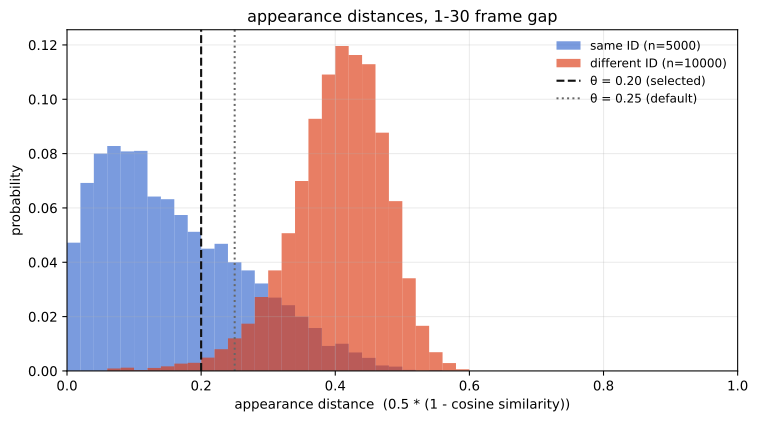
This is what rates_at prints for two thresholds:
reid_config.appearance_threshold |
same-person pairs below | different-person pairs below |
|---|---|---|
| 0.20 | 68% | 1.1% |
| 0.25 (paper default) | 79% | 2.9% |
Moving the threshold right accepts more same-person pairs, but it also starts letting different-person pairs through. We use 0.2, the same value as the MOT17 re-ID study (Table 8).
If the two groups overlap instead, no threshold separates them: any value that keeps most same-person pairs also lets many different-person pairs through. Check the proximity threshold and fusion method first, and consider an encoder fine-tuned on your footage, see results.
How far the threshold carries
A histogram fixes one frame gap, so it only describes re-association over that horizon. Sweeping the gap shows how long a track can stay lost before appearance stops helping to re-find it. sweep_frame_gap repeats the sampling above across widening bands, and plot_frame_gap_sweep draws the result:
from trackers.reid import plot_frame_gap_sweep, sweep_frame_gap

sweep = sweep_frame_gap(embeddings, ids, frame_ids, sequence_ids, pairs_per_class=8000)
plot_frame_gap_sweep(sweep, thresholds={0.20: "selected", 0.25: "default"})
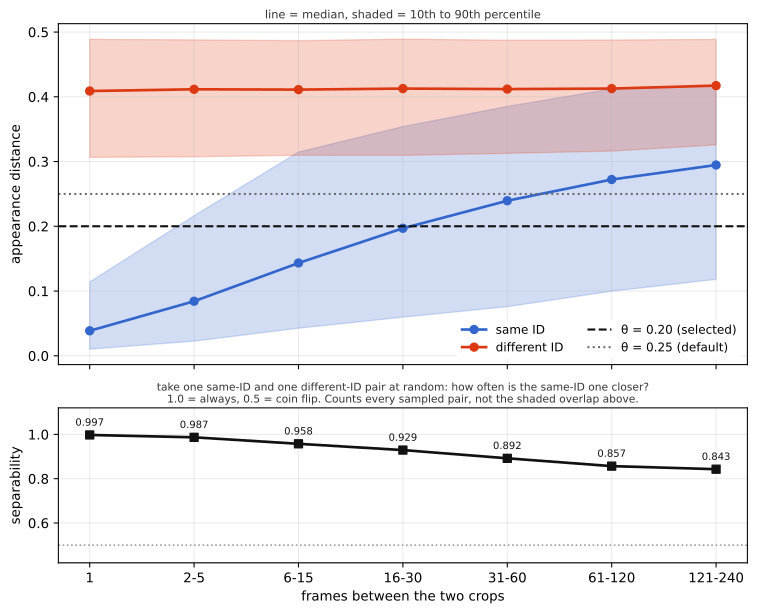
On MOT17 val, pairs of different people stay about as far apart at every gap. Pairs of the same person drift apart as the gap grows, because pose, lighting and occlusion change, so a threshold that catches them one frame apart misses more of them after a long absence.
From this we learn:
- Check the threshold at the gap you care about. A threshold that works one frame apart can fail after a lost track: at 0.2 it matches 98% of same-person pairs one frame apart, but only 51% across the default 30-frame
lost_track_buffer. - Long gaps make people harder to tell apart. The same person looks less like themselves after a long absence, so same-person and different-person distances overlap more: ROC AUC, explained below, falls from 0.997 at a 1-frame gap to 0.843 beyond 120 frames. With the threshold at 0.2, appearance stops recognizing most people after a long absence: only 26% of same-person pairs more than 120 frames apart are under 0.2, against 98% one frame apart. Raising the threshold to catch those also lets more different people through, so if you increase
lost_track_buffer, check both rates at that gap before raisingreid_config.appearance_threshold.
How to read ROC AUC, and the numbers per frame gap
ROC AUC answers one question: if you pick one pair of crops of the same person and one pair of different people at random, how often is the same-person pair closer? 1.0 means always, so some threshold separates the two groups perfectly. 0.5 means a coin flip, so appearance tells you nothing. Unlike the two rates in the table, it does not depend on a chosen threshold. It is also not where the shaded bands overlap in the figure: those bands only span the 10th to 90th percentiles, so at a 1-frame gap they never touch even though the AUC is 0.997.
How it is calculated: each frame-gap band gets its own sample of same-person and different-person pairs. For every threshold from 0 to 1, count the share of same-person pairs below it and the share of different-person pairs below it, and plot the first share against the second. That traces the ROC curve from (0, 0) to (1, 1), and ROC AUC is the area under it. sweep_frame_gap gets the same number without drawing the curve, by comparing every same-person distance with every different-person distance and counting how often the same-person one is smaller, with ties counting as half (trackers.reid.roc_auc). The result is the lower panel of the figure above.
The last two columns show the two rates at a threshold of 0.2.
| Frame gap | ROC AUC | same-ID below 0.2 | different-ID below 0.2 |
|---|---|---|---|
| 1 | 0.997 | 97.9% | 1.5% |
| 2 to 5 | 0.987 | 87.6% | 1.5% |
| 6 to 15 | 0.958 | 66.8% | 1.1% |
| 16 to 30 | 0.929 | 50.9% | 1.1% |
| 31 to 60 | 0.892 | 39.6% | 0.7% |
| 61 to 120 | 0.857 | 29.8% | 0.9% |
| 121 to 240 | 0.843 | 26.4% | 0.6% |
Choosing a proximity threshold
reid_config.proximity_threshold decides which track-detection pairs appearance is allowed to score. A pair is dropped before appearance is consulted whenever 1 - IoU exceeds the threshold, so the 0.5 default limits appearance to pairs that already overlap at IoU >= 0.5, and 0.99 still requires IoU >= 0.01. Only 1.0 disables the gate.
While a track is lost it has no detection of its own, so it is matched through its estimated position, which keeps moving as if the target had carried on. After a short occlusion that estimate has drifted, so it barely overlaps the detection when the target reappears. After the target leaves the frame it drifts out of view entirely and the overlap drops to zero. The 0.5 default blocks appearance in both cases, 0.99 lets it score the first one, and only 1.0 lets it score the second. BoT-SORT has no separate step for targets that leave and return, so opening the gate is the only way to keep their ID.
SoccerNet test, oracle detections, osnet_x1_0_soccernet, library-default motion parameters, reid_config.fusion="adaptive" with its default weights and reid_config.appearance_threshold=0.5:
reid_config.proximity_threshold |
appearance consulted when | HOTA | IDF1 | ID switches |
|---|---|---|---|---|
| none (no ReID) | 84.56 | 79.35 | 2939 | |
| 0.5 (default) | IoU >= 0.50 |
84.52 | 79.27 | 3012 |
| 0.8 | IoU >= 0.20 |
85.02 | 79.71 | 3268 |
| 1.0 | always | 85.46 | 81.18 | 1734 |
SoccerNet SNMOT-147, top to bottom: gate 0.5, 0.8 and 1.0. The player who leaves the frame gets a new ID at 0.5 and 0.8, and keeps it at 1.0.
HOTA and IDF1 improve as the gate opens, but ID switches do not follow the same curve. At 0.8 they are higher than with the default gate or without ReID: appearance can now match more distant boxes, but not yet the ones that recover a lost track. With the gate fully open they drop below both. If you open the gate, open it all the way.
The right value depends on the footage. Use 1.0 when targets leave the frame or the camera moves a lot. Keep 0.5 when targets stay in view, as in DanceTrack: there an open gate only adds wrong matches between people who look alike.
Tuning the thresholds
The steps above give a good starting point. trackers tune then searches reid_config.appearance_threshold and reid_config.proximity_threshold together, keeping the motion parameters you pass fixed, see Tune ReID Thresholds. The command searches both thresholds under either fusion method; for "adaptive" it does not search the weights yet.
Results
BoT-SORT without Re-ID and with each Re-ID fusion method on the test splits, using the same detections and motion parameters. The ReID thresholds were tuned on a separate split first, and each configuration was then evaluated once on test. The best value for each dataset is in bold. Motion parameters are the tuned values from the tracker comparison.
osnet_x1_0 fine-tuned on each dataset's train split (osnet_x1_0_mot17, osnet_x1_0_sportsmot, osnet_x1_0_dancetrack, osnet_x1_0_soccernet), with reid_config.fusion="botsort" and reid_config.fusion="adaptive".
| Dataset | Re-ID fusion | HOTA | IDF1 | MOTA |
|---|---|---|---|---|
| MOT17 | none | 63.8 | 78.7 | 79.4 |
"botsort" |
64.0 | 78.9 | 79.4 | |
"adaptive" |
64.0 | 79.2 | 79.4 | |
| SportsMOT | none | 74.1 | 74.1 | 96.9 |
"botsort" |
77.8 | 78.5 | 96.9 | |
"adaptive" |
76.4 | 76.8 | 97.0 | |
| DanceTrack | none | 57.8 | 57.9 | 92.2 |
"botsort" |
60.8 | 61.6 | 91.7 | |
"adaptive" |
58.3 | 58.2 | 92.3 | |
| SoccerNet | none | 85.0 | 79.7 | 97.2 |
"botsort" |
87.3 | 83.2 | 98.7 | |
"adaptive" |
88.4 | 84.4 | 99.3 |
Tuned ReID configuration
Tuned ReID configuration for each dataset and fusion method. Motion parameters are the BoT-SORT values from the tracker comparison, except minimum_iou_threshold_first_assoc where listed.
MOT17:
  botsort:
    reid_model: osnet_x1_0_mot17
    reid_config.appearance_threshold: 0.0448
    reid_config.proximity_threshold: 0.2697
  adaptive:
    reid_model: osnet_x1_0_mot17
    reid_config.appearance_weight: 2.124
    reid_config.adaptive_weight_cap: 0.959
    reid_config.appearance_threshold: 0.2155
    reid_config.proximity_threshold: 0.342
    minimum_iou_threshold_first_assoc: 0.205

SportsMOT:
  botsort:
    reid_model: osnet_x1_0_sportsmot
    reid_config.appearance_threshold: 0.3425
    reid_config.proximity_threshold: 0.9953
  adaptive:
    reid_model: osnet_x1_0_sportsmot
    reid_config.appearance_weight: 1.290
    reid_config.adaptive_weight_cap: 0.718
    reid_config.appearance_threshold: 0.245
    reid_config.proximity_threshold: 0.983
    minimum_iou_threshold_first_assoc: 0.329

DanceTrack:
  botsort:
    reid_model: osnet_x1_0_dancetrack
    reid_config.appearance_threshold: 0.4716
    reid_config.proximity_threshold: 0.6802
  adaptive:
    reid_model: osnet_x1_0_dancetrack
    reid_config.appearance_weight: 1.947
    reid_config.adaptive_weight_cap: 0.944
    reid_config.appearance_threshold: 0.193
    reid_config.proximity_threshold: 0.690
    minimum_iou_threshold_first_assoc: 0.946

SoccerNet:
  botsort:
    reid_model: osnet_x1_0_soccernet
    reid_config.appearance_threshold: 0.075
    reid_config.proximity_threshold: 1.0
  adaptive:
    reid_model: osnet_x1_0_soccernet
    reid_config.appearance_weight: 0.75
    reid_config.adaptive_weight_cap: 0.5
    reid_config.proximity_threshold: 1.0
    reid_config.appearance_threshold: 0.1
Every configuration was tuned with trackers tune on its own tuning split¹, 20 trials per fusion method, then evaluated once on test.
¹ SoccerNet-tracking has no validation split. This encoder was trained on the first 45 of the 57 train sequences, so its thresholds were tuned on the other 12 (SNMOT-159 to SNMOT-170). The other datasets tune on val, MOT17 on val-half.
Fine-tuning improves on BoT-SORT without ReID on every dataset: on test it adds 3.67 HOTA on SportsMOT, 3.43 on SoccerNet with adaptive, 3.00 on DanceTrack and 0.20 on MOT17.
Each encoder is one training run, and training is not deterministic across seeds: two SportsMOT encoders trained identically apart from the seed scored 83.50 and 83.72 on val, and on DanceTrack the spread across three seeds reached 1.54 HOTA. Treat differences below a point between fine-tuned rows as noise. The SportsMOT encoder is the better of its two seeds, chosen on val; crops_per_identity=8 is carried over from DanceTrack rather than tuned per dataset.
Encoders used as published, without training on your data. fastreid_mot17_sbs50 was trained on MOT17 by the BoT-SORT authors, so its MOT17 rows are in domain; on the other datasets it has not seen the footage, and it still helps on SportsMOT. Both fusion methods were tuned with trackers tune, 20 trials each, on each dataset's tuning split².
| Dataset | Re-ID fusion | HOTA | IDF1 | MOTA |
|---|---|---|---|---|
| MOT17 | none | 63.8 | 78.7 | 79.4 |
"botsort" |
63.8 | 78.8 | 79.4 | |
"adaptive" |
64.6 | 79.9 | 79.4 | |
| SportsMOT | none | 74.1 | 74.1 | 96.9 |
"botsort" |
75.5 | 75.5 | 96.9 | |
"adaptive" |
74.1 | 73.7 | 96.9 | |
| DanceTrack | none | 57.8 | 57.9 | 92.2 |
"botsort" |
57.6 | 57.6 | 92.1 | |
"adaptive" |
57.5 | 57.3 | 92.3 | |
| SoccerNet | none | 85.0 | 79.7 | 97.2 |
"botsort" |
85.0 | 79.7 | 97.2 | |
"adaptive" |
85.9 | 80.4 | 97.9 |
Tuned ReID configuration
Tuned ReID configuration for each dataset. Motion parameters are the BoT-SORT values from the tracker comparison.
MOT17:
  botsort:
    reid_model: fastreid_mot17_sbs50
    reid_config.appearance_threshold: 0.10
    reid_config.proximity_threshold: 0.5
  adaptive:
    reid_model: fastreid_mot17_sbs50
    reid_config.appearance_weight: 1.908
    reid_config.adaptive_weight_cap: 0.545
    reid_config.appearance_threshold: 0.3095
    reid_config.proximity_threshold: 0.772
    minimum_iou_threshold_first_assoc: 0.846

SportsMOT:
  botsort:
    reid_model: fastreid_mot17_sbs50
    reid_config.appearance_threshold: 0.4761
    reid_config.proximity_threshold: 0.5051
  adaptive:
    reid_model: fastreid_mot17_sbs50
    reid_config.appearance_weight: 2.540
    reid_config.adaptive_weight_cap: 0.778
    reid_config.appearance_threshold: 0.1085
    reid_config.proximity_threshold: 0.216
    minimum_iou_threshold_first_assoc: 0.176

DanceTrack:
  botsort:
    reid_model: fastreid_mot17_sbs50
    reid_config.appearance_threshold: 0.4822
    reid_config.proximity_threshold: 0.5068
  adaptive:
    reid_model: fastreid_mot17_sbs50
    reid_config.appearance_weight: 0.75
    reid_config.adaptive_weight_cap: 0.5
    reid_config.appearance_threshold: 0.5
    reid_config.proximity_threshold: 0.5

SoccerNet:
  botsort:
    reid_model: fastreid_mot17_sbs50
    reid_config.appearance_threshold: 0.0467
    reid_config.proximity_threshold: 0.3511
  adaptive:
    reid_model: fastreid_mot17_sbs50
    reid_config.appearance_weight: 1.178
    reid_config.adaptive_weight_cap: 0.621
    reid_config.appearance_threshold: 0.4025
    reid_config.proximity_threshold: 0.975
    minimum_iou_threshold_first_assoc: 0.349
² SoccerNet-tracking has no validation split, so its tuning split is train. The other datasets tune on val, MOT17 on val-half.
On test, a generic encoder adds HOTA on MOT17 with adaptive (+0.72), on SportsMOT with botsort (+1.31) and on SoccerNet with adaptive (+0.89), and stays below BoT-SORT on DanceTrack. On SoccerNet only the additive rule helps; under botsort the same encoder is flat, because the gate it was tuned to keeps appearance away from the pairs that would benefit.
On MOT17 the tuning split preferred botsort by 0.10 HOTA, while adaptive scored 0.73 higher on test, the best MOT17 result on this page.
SoccerNet uses ground-truth boxes as detections, so its numbers are not comparable to the YOLOX rows.
Speed
BoT-SORT extracts ReID embeddings only for detections with confidence at or above high_conf_det_threshold (0.6 by default). Running the encoder lowers throughput.
The table gives frames per second (FPS) of tracker.update over every sequence of each tuning split, with library defaults, camera motion compensation on, and the provided detections. Detection time is not included. Measured on a Google Colab T4 GPU with a 2-vCPU Intel Xeon @ 2.00GHz.
The columns compare BoT-SORT without ReID, with the dataset's fine-tuned osnet_x1_0_<dataset>, and with the same fastreid_mot17_sbs50 on every dataset.
| Dataset | Split | BoT-SORT without ReID (FPS) | BoT-SORT + fine-tuned OSNet (FPS) | BoT-SORT + FastReID (FPS) |
|---|---|---|---|---|
| MOT17 | val-half | 31.1 | 10.7 | 6.1 |
| SportsMOT | val | 38.4 | 16.3 | 10.3 |
| DanceTrack | val | 33.8 | 15.4 | 10.9 |
| SoccerNet | train | 32.6 | 13.2 | 6.8 |
With the fine-tuned OSNet, BoT-SORT runs 2.2 to 2.9 times slower than without ReID. With FastReID, it runs 3.1 to 5.1 times slower than without ReID.